> ## Documentation Index
> Fetch the complete documentation index at: https://docs.mykit.info/llms.txt
> Use this file to discover all available pages before exploring further.
# Ammunition
> Track factory and hand-loaded ammunition inventory, and manage reloading recipes and components.
 ## Overview
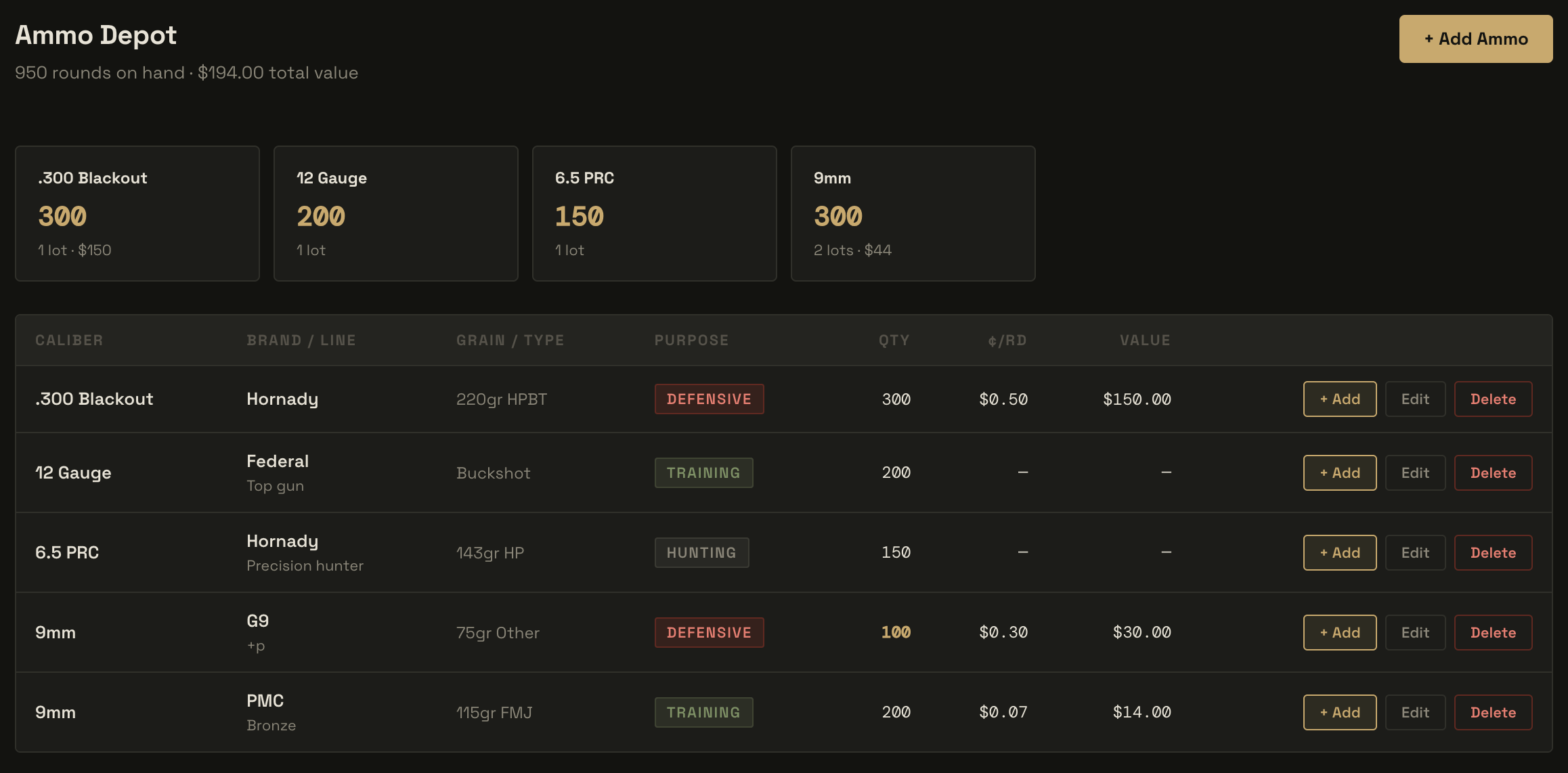
The Ammunition module manages your organization's ammo inventory and reloading operation. It is split into two tabs: **Ammunition** for tracking lots of factory and hand-loaded ammo, and **Reloading Bench** for managing components, recipes, and tools.
***
## Ammunition tab
The Ammunition tab lists every lot in inventory. The header shows total rounds on hand and total estimated inventory value across all lots.
### Adding a factory ammo lot
1. Navigate to **Ammunition** in the left sidebar.
2. Click **+ Add Ammo**.
3. Leave the **Hand Loaded** toggle off.
4. Select a caliber from the dropdown, or choose **Other (custom)** and type it in.
5. Fill in brand, product line, grain weight, bullet type, casing material, and purpose.
6. Enter the quantity (round count), and optionally set a low-stock alert threshold, cost per round, and storage location.
7. Optionally assign the lot to a designated firearm, and record the purchase date, lot number, and product URL.
8. Save.
### Common calibers
The caliber picker includes common options. Enter a free-text caliber for anything not in the list:
9mm · .45 ACP · .40 S\&W · .380 ACP · 10mm Auto · .357 Magnum · .357 SIG · .38 Special · .44 Magnum · .22 LR · .22 WMR · .223 Rem / 5.56 NATO · .308 Win / 7.62 NATO · 6.5 Creedmoor · 6.5 Grendel · .300 Blackout · .300 Win Mag · 7.62×39mm · .338 Lapua Magnum · 12 Gauge · 20 Gauge · .410 Bore
### Bullet types
FMJ · JHP · HP · HPBT · SP · JSP · OTM · Frangible · Tracer · Subsonic · Buckshot · Slug · Other
### Purpose
Each lot can be tagged with a purpose — **Defensive**, **Training**, **Competition**, **Hunting**, or **Other** — which is shown as a color-coded badge in the inventory list.
### Hand-loaded lots
Toggle **Hand Loaded** on to log a lot produced from your own reloading bench. In this mode:
* The brand and product line fields are replaced with a **Reloading Recipe** selector that pulls from your Reloading Bench recipes.
* Selecting a recipe auto-populates the caliber and calculates the **cost per round** from the component costs defined in the recipe.
* A **Date Loaded** field replaces the purchase date.
Hand-loaded lots appear in the inventory list alongside factory ammo and count toward totals the same way.
### Low-stock alerts
Set a **Low Stock Alert** threshold (round count) on any lot. When inventory falls below that number, the quantity is highlighted amber in the list. When a lot reaches zero rounds it is highlighted red. The default alert threshold if none is set is 100 rounds.
### Adjusting quantity
Open a lot from the list and click **Restock** to add rounds, or **Adjust** to set the quantity directly. Range Day sessions automatically deduct rounds fired from the designated firearm's linked ammo lot when a drill result is recorded.
### Designated firearm
Assigning a **Designated Firearm** to a lot links that ammo to a specific firearm in the Armory. This drives automatic round deduction when range sessions are logged and appears on the firearm's detail page.
***
## Reloading Bench tab
The Reloading Bench is a full sub-module for hand-loaders. It tracks the four component types (projectiles, powder, primers, brass), reloading recipes that combine them into a named load, and the equipment used to load them.
### Components
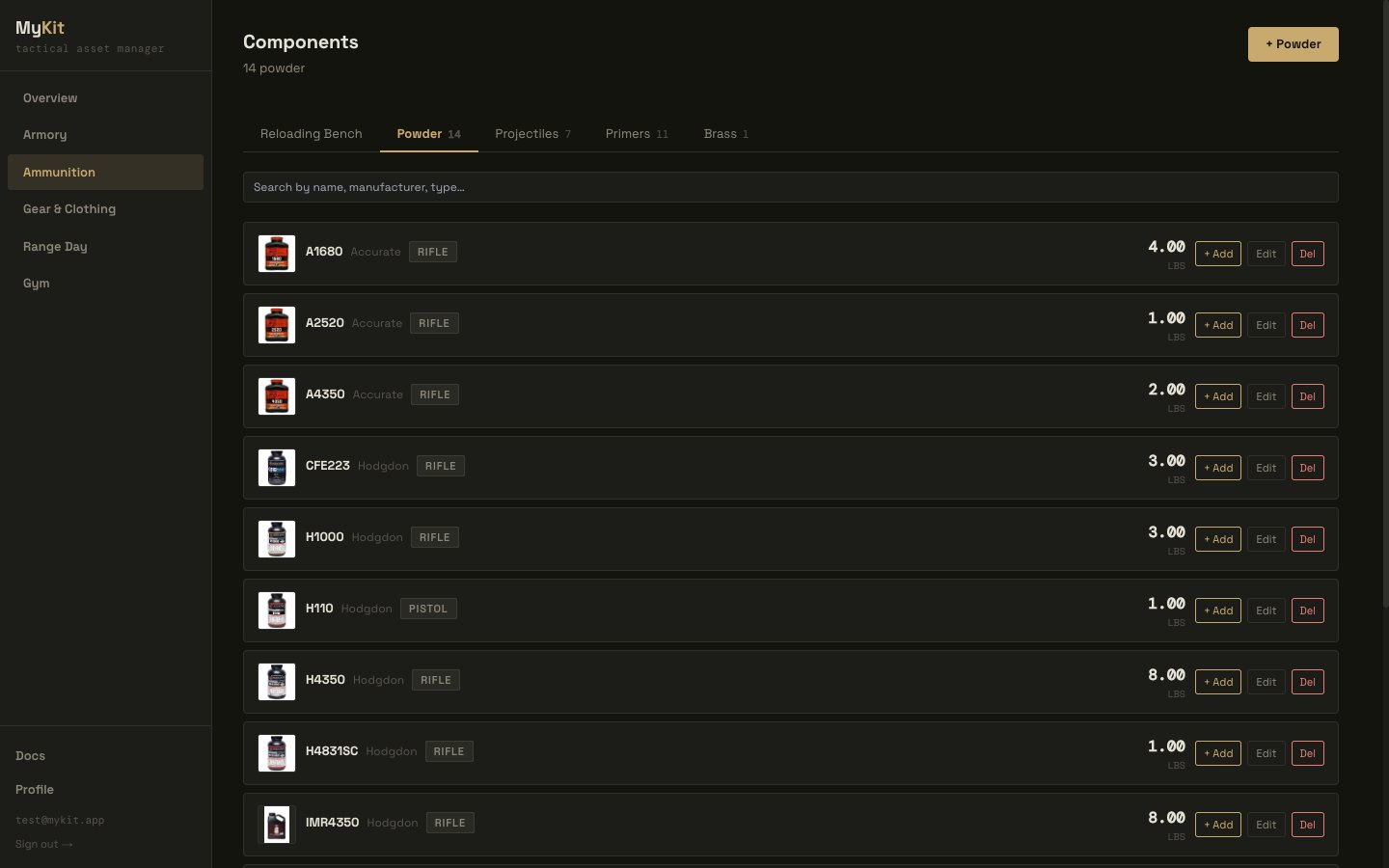
Components are the raw materials for hand-loading. Each type has its own inventory section within the Reloading Bench, with sub-tabs for Powder, Projectiles, Primers, and Brass.
## Overview
The Ammunition module manages your organization's ammo inventory and reloading operation. It is split into two tabs: **Ammunition** for tracking lots of factory and hand-loaded ammo, and **Reloading Bench** for managing components, recipes, and tools.
***
## Ammunition tab
The Ammunition tab lists every lot in inventory. The header shows total rounds on hand and total estimated inventory value across all lots.
### Adding a factory ammo lot
1. Navigate to **Ammunition** in the left sidebar.
2. Click **+ Add Ammo**.
3. Leave the **Hand Loaded** toggle off.
4. Select a caliber from the dropdown, or choose **Other (custom)** and type it in.
5. Fill in brand, product line, grain weight, bullet type, casing material, and purpose.
6. Enter the quantity (round count), and optionally set a low-stock alert threshold, cost per round, and storage location.
7. Optionally assign the lot to a designated firearm, and record the purchase date, lot number, and product URL.
8. Save.
### Common calibers
The caliber picker includes common options. Enter a free-text caliber for anything not in the list:
9mm · .45 ACP · .40 S\&W · .380 ACP · 10mm Auto · .357 Magnum · .357 SIG · .38 Special · .44 Magnum · .22 LR · .22 WMR · .223 Rem / 5.56 NATO · .308 Win / 7.62 NATO · 6.5 Creedmoor · 6.5 Grendel · .300 Blackout · .300 Win Mag · 7.62×39mm · .338 Lapua Magnum · 12 Gauge · 20 Gauge · .410 Bore
### Bullet types
FMJ · JHP · HP · HPBT · SP · JSP · OTM · Frangible · Tracer · Subsonic · Buckshot · Slug · Other
### Purpose
Each lot can be tagged with a purpose — **Defensive**, **Training**, **Competition**, **Hunting**, or **Other** — which is shown as a color-coded badge in the inventory list.
### Hand-loaded lots
Toggle **Hand Loaded** on to log a lot produced from your own reloading bench. In this mode:
* The brand and product line fields are replaced with a **Reloading Recipe** selector that pulls from your Reloading Bench recipes.
* Selecting a recipe auto-populates the caliber and calculates the **cost per round** from the component costs defined in the recipe.
* A **Date Loaded** field replaces the purchase date.
Hand-loaded lots appear in the inventory list alongside factory ammo and count toward totals the same way.
### Low-stock alerts
Set a **Low Stock Alert** threshold (round count) on any lot. When inventory falls below that number, the quantity is highlighted amber in the list. When a lot reaches zero rounds it is highlighted red. The default alert threshold if none is set is 100 rounds.
### Adjusting quantity
Open a lot from the list and click **Restock** to add rounds, or **Adjust** to set the quantity directly. Range Day sessions automatically deduct rounds fired from the designated firearm's linked ammo lot when a drill result is recorded.
### Designated firearm
Assigning a **Designated Firearm** to a lot links that ammo to a specific firearm in the Armory. This drives automatic round deduction when range sessions are logged and appears on the firearm's detail page.
***
## Reloading Bench tab
The Reloading Bench is a full sub-module for hand-loaders. It tracks the four component types (projectiles, powder, primers, brass), reloading recipes that combine them into a named load, and the equipment used to load them.
### Components
Components are the raw materials for hand-loading. Each type has its own inventory section within the Reloading Bench, with sub-tabs for Powder, Projectiles, Primers, and Brass.
 #### Projectiles
| Field | Notes |
| -------------------- | -------------------------------- |
| Caliber | e.g. .308 Win |
| Weight (gr) | Bullet weight in grains |
| Bullet type | FMJ, JHP, HPBT, OTM, etc. |
| Manufacturer / Model | e.g. Berger, Sierra |
| Quantity | Units on hand |
| Cost per unit | Used in recipe cost calculations |
#### Powder
| Field | Notes |
| -------------- | ------------------------------------ |
| Name | e.g. Varget, H4350 |
| Manufacturer | e.g. Hodgdon, IMR |
| Powder type | Rifle, Pistol, Shotgun, Muzzleloader |
| Quantity (lbs) | Weight on hand |
| Cost per lb | Used in recipe cost calculations |
#### Primers
| Field | Notes |
| --------------------------- | ----------------------------------------------------------------------------- |
| Manufacturer / Product line | e.g. CCI BR2, Federal 210M |
| Primer type | Small/Large Pistol, Small/Large Rifle, Magnum variants, 209 Shotshell, Berdan |
| Quantity | Units on hand |
| Cost per unit | Used in recipe cost calculations |
#### Brass
| Field | Notes |
| ------------------------ | ------------------------------------------------------------------------------------------------------------------------------------------- |
| Caliber | e.g. 6.5 Creedmoor |
| Manufacturer / Headstamp | e.g. Lapua, Starline |
| Identifier | Free-text label used to tell lots apart, e.g. "Lot A", "Range Brass" — shown as the primary name for the lot throughout the Reloading Bench |
| Times Fired | Firing count for the lot, useful for tracking brass life |
| Quantity | Cases on hand |
| Cost per case | Used in recipe cost calculations |
#### Projectiles
| Field | Notes |
| -------------------- | -------------------------------- |
| Caliber | e.g. .308 Win |
| Weight (gr) | Bullet weight in grains |
| Bullet type | FMJ, JHP, HPBT, OTM, etc. |
| Manufacturer / Model | e.g. Berger, Sierra |
| Quantity | Units on hand |
| Cost per unit | Used in recipe cost calculations |
#### Powder
| Field | Notes |
| -------------- | ------------------------------------ |
| Name | e.g. Varget, H4350 |
| Manufacturer | e.g. Hodgdon, IMR |
| Powder type | Rifle, Pistol, Shotgun, Muzzleloader |
| Quantity (lbs) | Weight on hand |
| Cost per lb | Used in recipe cost calculations |
#### Primers
| Field | Notes |
| --------------------------- | ----------------------------------------------------------------------------- |
| Manufacturer / Product line | e.g. CCI BR2, Federal 210M |
| Primer type | Small/Large Pistol, Small/Large Rifle, Magnum variants, 209 Shotshell, Berdan |
| Quantity | Units on hand |
| Cost per unit | Used in recipe cost calculations |
#### Brass
| Field | Notes |
| ------------------------ | ------------------------------------------------------------------------------------------------------------------------------------------- |
| Caliber | e.g. 6.5 Creedmoor |
| Manufacturer / Headstamp | e.g. Lapua, Starline |
| Identifier | Free-text label used to tell lots apart, e.g. "Lot A", "Range Brass" — shown as the primary name for the lot throughout the Reloading Bench |
| Times Fired | Firing count for the lot, useful for tracking brass life |
| Quantity | Cases on hand |
| Cost per case | Used in recipe cost calculations |
 ### Recipes
A recipe defines a complete hand-load by combining components with specific charges and seating dimensions.
### Recipes
A recipe defines a complete hand-load by combining components with specific charges and seating dimensions.
 **Identification fields:**
* Name (e.g. "168gr Varget Match Load")
* Caliber
* Purpose: Match, Hunting, Plinking, Defensive, Subsonic, Other
* Target firearm (optional — links the recipe to a specific Armory firearm)
**Component fields:**
* Projectile, Powder, Primer, Brass — each selected from your bench inventory
**Charge and seating fields:**
* Powder charge (grains)
* Crimp type: None, Taper, Roll, Factory, Other
* COAL (cartridge overall length, inches)
* CBTO (cartridge base to ogive, inches)
* Seat depth (inches)
**Performance fields:**
* Velocity (fps), SD (fps), ES (fps)
* Accuracy (MOA)
* Pressure signs (free text — e.g. "None", "Sticky bolt at max charge")
* **Proven load** checkbox — mark a recipe as field-validated
**Tools used:**
Select which tools from your bench inventory were used to load this recipe.
**Per-round cost:**
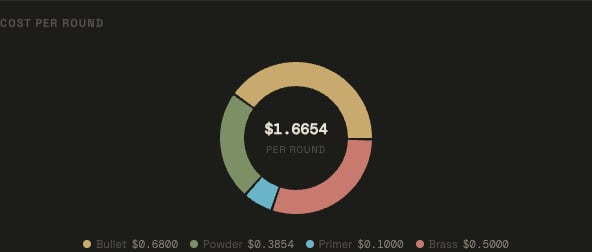
The recipe detail view shows a cost donut chart breaking down the per-round cost contribution from each component (projectile, powder, primer, brass) based on the cost fields and charge weight stored in your bench inventory.
**Identification fields:**
* Name (e.g. "168gr Varget Match Load")
* Caliber
* Purpose: Match, Hunting, Plinking, Defensive, Subsonic, Other
* Target firearm (optional — links the recipe to a specific Armory firearm)
**Component fields:**
* Projectile, Powder, Primer, Brass — each selected from your bench inventory
**Charge and seating fields:**
* Powder charge (grains)
* Crimp type: None, Taper, Roll, Factory, Other
* COAL (cartridge overall length, inches)
* CBTO (cartridge base to ogive, inches)
* Seat depth (inches)
**Performance fields:**
* Velocity (fps), SD (fps), ES (fps)
* Accuracy (MOA)
* Pressure signs (free text — e.g. "None", "Sticky bolt at max charge")
* **Proven load** checkbox — mark a recipe as field-validated
**Tools used:**
Select which tools from your bench inventory were used to load this recipe.
**Per-round cost:**
The recipe detail view shows a cost donut chart breaking down the per-round cost contribution from each component (projectile, powder, primer, brass) based on the cost fields and charge weight stored in your bench inventory.
 ### Process steps
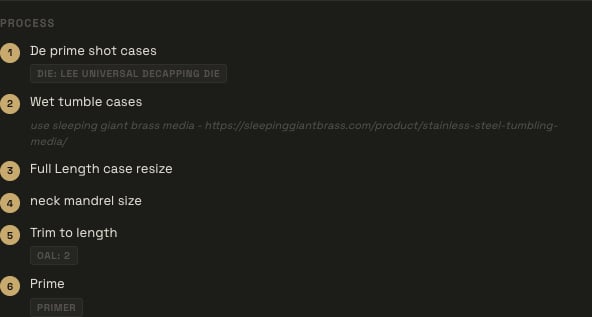
Recipes support an ordered list of process steps, letting you capture your actual loading procedure alongside the load data itself. Each step has:
* **Instruction** — free text describing the step, e.g. "Trim to length", "Prime", "Charge and seat".
* **Tool** (optional) — the specific tool from your bench inventory used for the step, e.g. a case trimmer or priming tool.
* **Component category** (optional) — link the step to a component type (projectile, powder, primer, or brass) when the step operates on that material.
* **Metric label + target** (optional) — record a measurement to hit at this step, e.g. label "Seat Depth" with target "0.010in", or label "Powder Charge" with target "46.5gr".
* **Notes** (optional) — anything else worth remembering for the step.
Add, reorder, or remove steps from the recipe form. They're shown in order on the recipe detail view as your repeatable loading checklist.
### Process steps
Recipes support an ordered list of process steps, letting you capture your actual loading procedure alongside the load data itself. Each step has:
* **Instruction** — free text describing the step, e.g. "Trim to length", "Prime", "Charge and seat".
* **Tool** (optional) — the specific tool from your bench inventory used for the step, e.g. a case trimmer or priming tool.
* **Component category** (optional) — link the step to a component type (projectile, powder, primer, or brass) when the step operates on that material.
* **Metric label + target** (optional) — record a measurement to hit at this step, e.g. label "Seat Depth" with target "0.010in", or label "Powder Charge" with target "46.5gr".
* **Notes** (optional) — anything else worth remembering for the step.
Add, reorder, or remove steps from the recipe form. They're shown in order on the recipe detail view as your repeatable loading checklist.
 ### Sharing a recipe
Recipes can be shared publicly via a tokenized link — useful for sharing a proven load with other shooters without requiring a MyKit.info account.
**To share a recipe:**
1. Open the recipe from the Recipes list or its detail drawer.
2. Click **Share**.
3. Choose a link expiration — 1 week, 1 month, or never expires.
4. Click **Generate link** and copy the URL.
### Sharing a recipe
Recipes can be shared publicly via a tokenized link — useful for sharing a proven load with other shooters without requiring a MyKit.info account.
**To share a recipe:**
1. Open the recipe from the Recipes list or its detail drawer.
2. Click **Share**.
3. Choose a link expiration — 1 week, 1 month, or never expires.
4. Click **Generate link** and copy the URL.
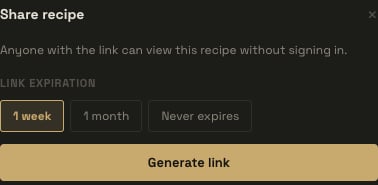 The shared page shows the recipe's load data, but not its cost fields. Only one active share link per recipe is supported at a time — generating a new link revokes the previous one. Revoke a link at any time from the same Share dialog; the dialog also shows the link's view count.
### Tools
The Tools section tracks your reloading equipment.
**Tool categories:**
Die · Press · Scale · Tumbler · Case Trimmer · Deprimer · Annealer · Calipers · Headspace Gauge · Bullet Comparator · Powder Thrower · Priming Tool · Case Prep · Other
Each tool records name, manufacturer, model, caliber (if applicable), condition (New / Good / Used / Needs Service / Retired), purchase price, and notes.
The shared page shows the recipe's load data, but not its cost fields. Only one active share link per recipe is supported at a time — generating a new link revokes the previous one. Revoke a link at any time from the same Share dialog; the dialog also shows the link's view count.
### Tools
The Tools section tracks your reloading equipment.
**Tool categories:**
Die · Press · Scale · Tumbler · Case Trimmer · Deprimer · Annealer · Calipers · Headspace Gauge · Bullet Comparator · Powder Thrower · Priming Tool · Case Prep · Other
Each tool records name, manufacturer, model, caliber (if applicable), condition (New / Good / Used / Needs Service / Retired), purchase price, and notes.
