Overview
The dashboard is the first screen after sign-in. It pulls live data from every module and surfaces the things that need your attention without requiring you to dig into each section.Stat cards
Four summary cards sit at the top of the page and link directly to the relevant module.
Click any card to navigate directly to that module.
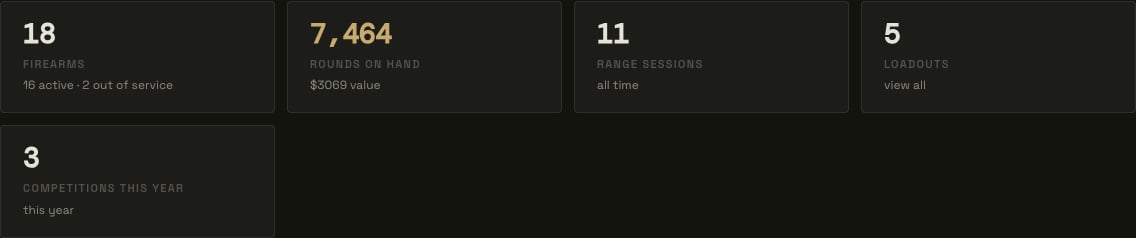
Stat cards — click through to any module
Action items
The Action Items list is the dashboard’s main focus. It automatically surfaces anything that needs your attention, ordered with critical items first.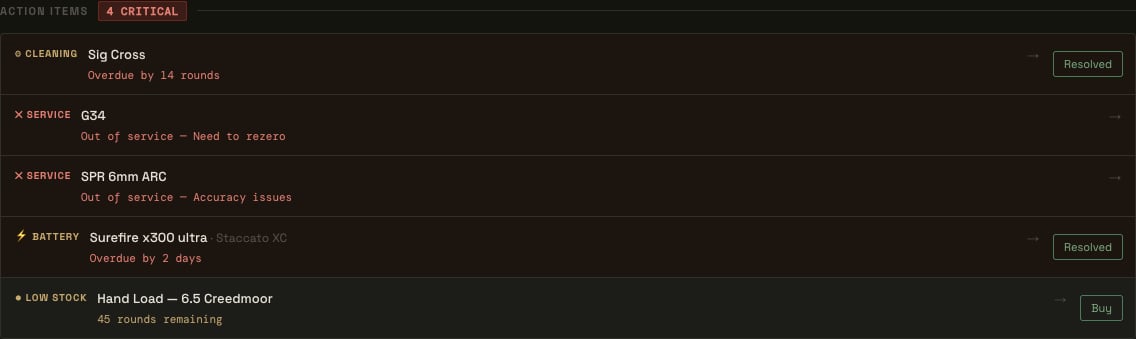
Action items — critical and warning items with inline resolve and buy actions
Item types
Resolving items
- Cleaning and battery items show a Resolved button directly on the row. Clicking it marks the firearm as cleaned or the battery as replaced without leaving the dashboard.
- Low-stock and out-of-stock ammo items show a Buy button. If the ammo lot has a product URL saved, clicking Buy opens that URL in a new tab. Otherwise it navigates to the ammo edit screen.
- Service and setup items link to the relevant module where the action must be taken.
Upcoming range sessions
Below action items, any range sessions with a future date are listed in chronological order. Each entry shows the session date, location, scheduled firearms, and ammo. Click an entry to open the full session detail in Range Day.
Upcoming range session with firearm, round count, and Google Calendar link
Upcoming competitions
Scheduled competition matches with a future date appear in the same area. Each entry shows the match name, date, and stage count. Click to open the competition detail in Range Day.Rounds trend
A configurable bar chart at the bottom of the page tracks rounds fired over time, pulled from range sessions and competitions.
Rounds trend — weekly totals with a configurable period count
- Toggle between Weekly and Monthly buckets.
- Set Periods to control how many bars are shown (e.g. the last 12 weeks or 12 months).
- The total for the current period and the trend versus the prior period are shown above the chart.