Overview
The Gear & Clothing module tracks everything your team carries or wears — plate carriers, holsters, medical kits, uniforms, boots, and more. It is split into two tabs: Items and Loadouts.Items tab
The Items tab is the inventory of individual gear pieces. Each item belongs to your organization and is visible only to your team.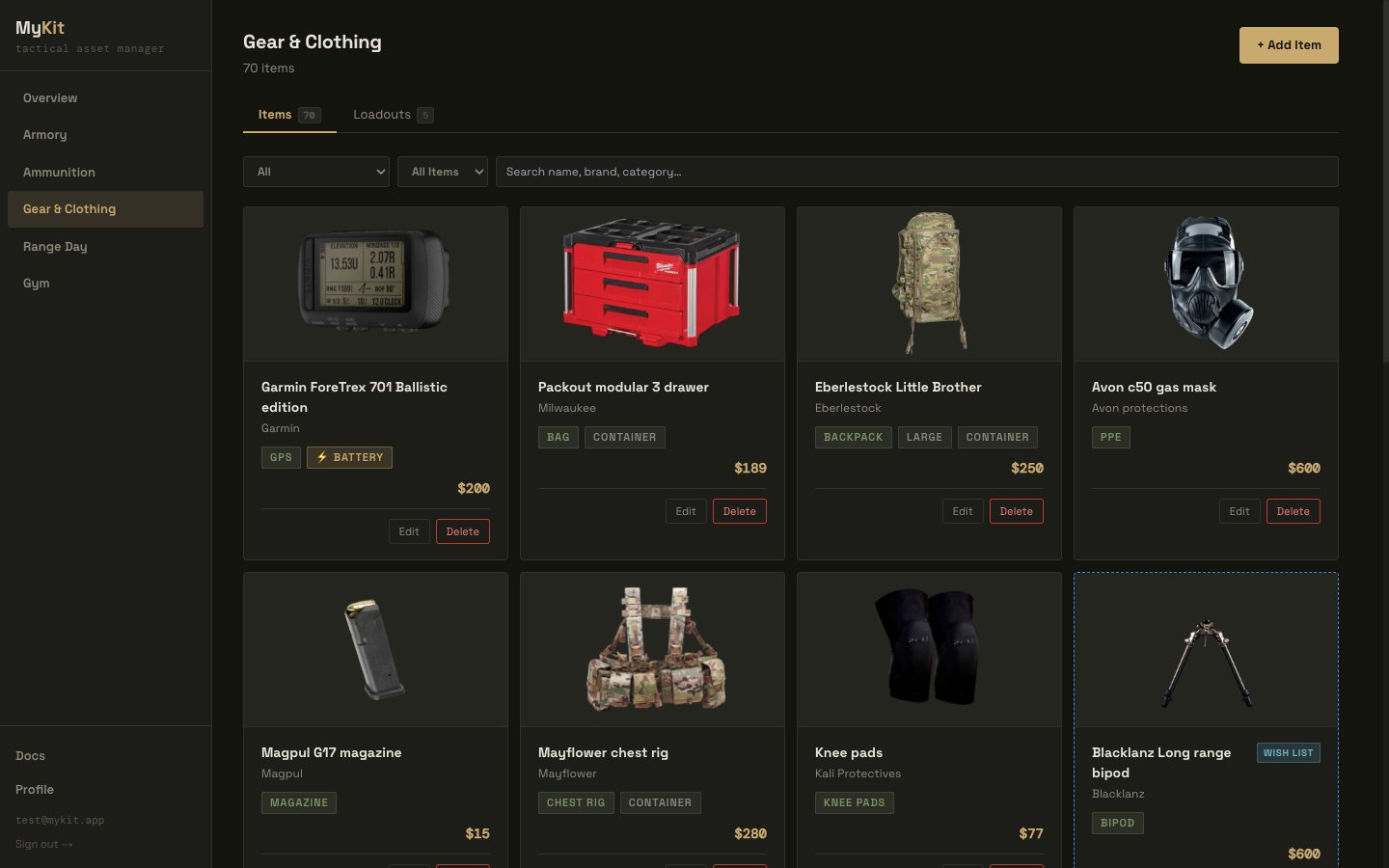
Items list — category and wish-list filters, container badges, and wish-list items shown with a dashed border
Categories
Items are organized by category. Choose from the built-in list or enter a custom category: Plate Carrier · Chest Rig · Holster · Belt · Magazine Pouches · Backpack · Bag · Light · Optics · Hearing Protection · Eye Protection · Knife · Medical / IFAK · Pants · Shirt · Jacket · Base Layer · Boots · Gloves · Hat · Other Select + Custom… at the bottom of the category dropdown to enter a free-text category that isn’t in the list.Adding an item
- Navigate to Gear & Clothing in the left sidebar.
- Click + Add Item.
- Enter the item name and select a category.
- Fill in brand, size/fit, weight, purchase price, date acquired, and product URL as needed.
- Configure battery, container, and service status options (see below).
- Optionally add a photo, notes, and attach documents.
- Save.
Battery tracking
Items that require power can be tracked in one of three modes:
Setting a change interval and last battery change date on battery-powered items lets the system surface battery change alerts when an item is overdue.
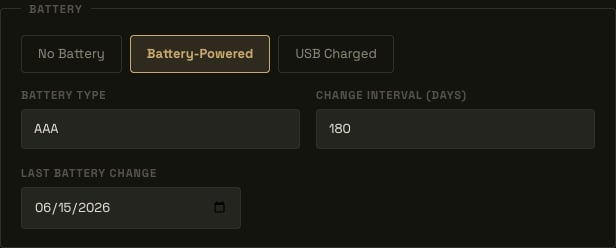
Battery tracking fields on the item form
Container flag
Toggle Is a Container when adding an item that physically holds other gear — a range bag, plate carrier, chest rig, or pack. Marking an item as a container makes it available as a nesting target inside Loadouts (see below). Items that are not containers cannot have other items placed inside them in a loadout.
The Container toggle on the item form
In-service status
Each item can be set to In Service or Out of Service. Choosing Out of Service reveals a Reason text field to record why (damaged, sent for repair, retired, etc.). Out-of-service items remain in the list and are still available to add to loadouts, but are visually marked.Wish list
Toggle Wish List to mark an item as a planned purchase rather than owned inventory. Wish-list items display with a dashed blue border and a Wish List badge. Use the wish-list filter on the Items list to show All, Owned only, or Wish List only.Loadouts tab
A loadout is a named snapshot of the firearms and gear you plan to carry for a specific purpose — a PRS match, a hunting trip, EDC, or a range day. Loadouts pull from your existing Armory and Gear inventories; they do not create copies of items.Creating a loadout
- Go to Gear & Clothing → Loadouts tab.
- Click + New Loadout.
- Enter a name (e.g. “PRS Match”, “Hunting”, “EDC”) and an optional description.
- Use the search bar to find firearms and gear by name, brand, or category and add them to the loadout.
- Configure placement and quantity for each item (see below).
- Save.
Item placement
Each item in a loadout has two placement options:- Worn on body — the item is carried directly on the person (a holster on the belt, a plate carrier on the chest).
- Placed in a container — the item is packed inside another item in the loadout that is marked as a container.
Nested containers
If a loadout includes an item flagged as a container (a range bag, backpack, plate carrier), other items — including other containers — can be placed inside it. This creates a hierarchical packing structure that mirrors how gear is actually organized.- Items nested inside a container are displayed indented beneath it.
- Removing a container from the loadout detaches all its nested items (they revert to top-level, not deleted).
- Nesting depth is capped to prevent runaway hierarchies.
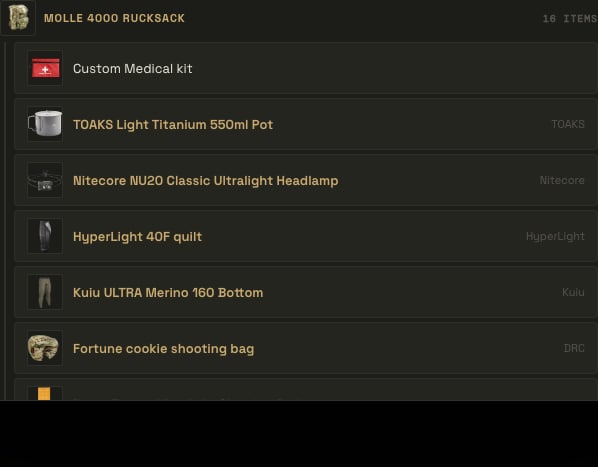
A container nested inside a top-level container, with its own contents indented beneath it
Quantity
Gear items support a quantity field for items carried in multiples — magazines, med supplies, patches, etc. Firearms always have a quantity of one.Weight summary
The loadout detail view shows a weight donut chart that breaks down total loadout weight by item. Weight is pulled from the weight field on each firearm and gear item. Items without a recorded weight are excluded from the total.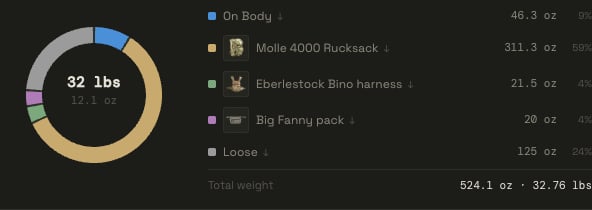
Weight donut — on-body weight plus a slice per top-level container
Sharing a loadout
Loadouts can be shared publicly via a tokenized link — useful for sharing a kit list with teammates, sponsors, or the broader community without requiring a MyKit.info account. To share a loadout:- Open the loadout from the Loadouts list.
- Click Share on the loadout card or detail view.
- Choose an expiry: 1 week, 1 month, or Never expires.
- Click Create Link — a unique URL is generated.
- Copy and share the URL. Recipients can view the full item list without logging in.
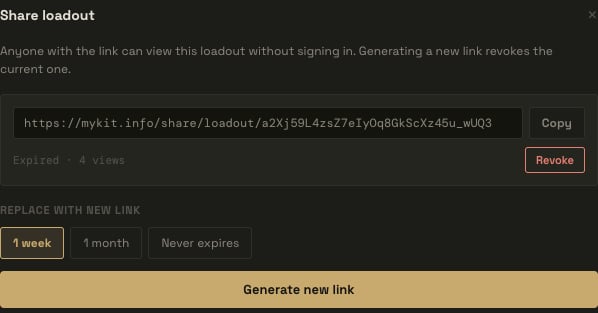
Share dialog — expiry options, copy link, and revoke
- Active share links are listed in the Share dialog with their expiry date.
- Click Revoke to invalidate a link immediately. Previously shared URLs will return a 404 after revocation.
- Only one active share link per loadout is supported at a time. Creating a new link replaces the previous one.